Quick Quote / Free, Pro & Teams
Work out the buy. Balance the trade.
Build collection offers with Quick Quote and balance incoming cards, outgoing cards, and cash with Vendilot’s TCG trade calculator. Keep accepted deals connected to inventory.
- Build offers across supported card catalogs.
- Adjust buy percentages and individual values.
- Balance incoming cards, outgoing cards, and cash in a trade.
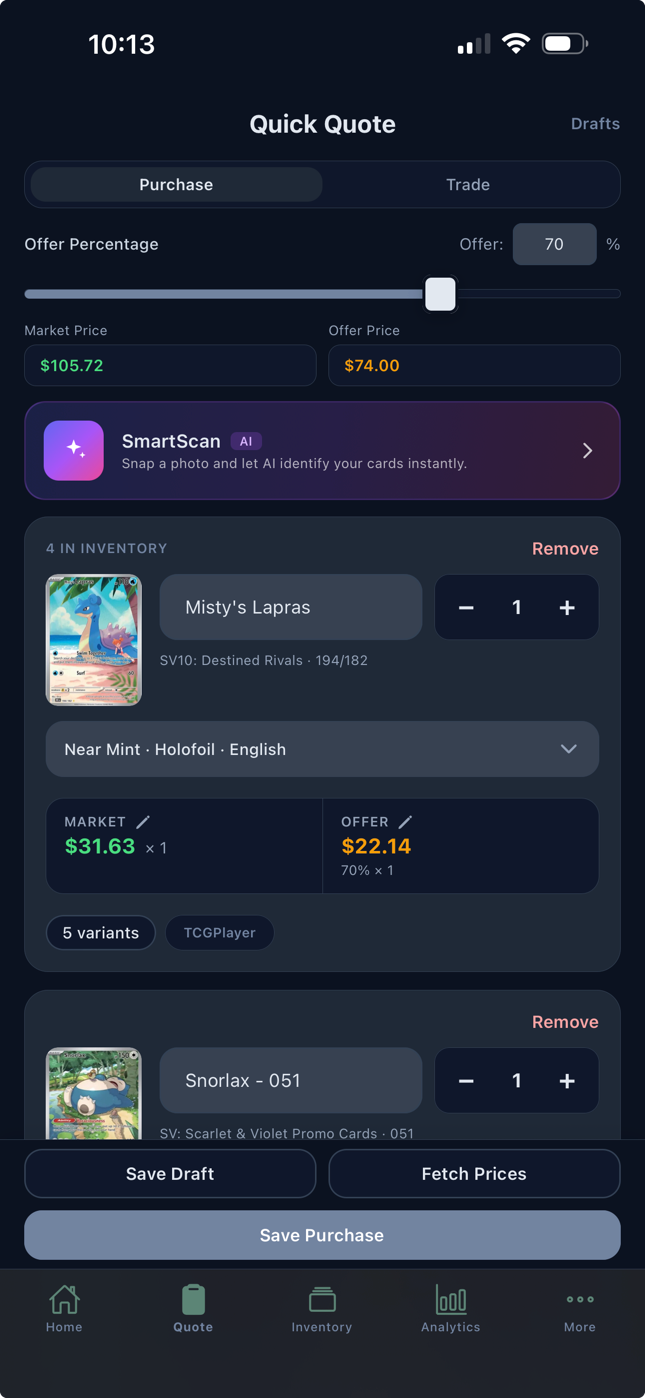
Put the collection in one place.
Search for the card, choose the relevant printing, and confirm its condition. Quick Quote keeps the working collection together so you can see what is driving the total.
Start from SmartScan results to reduce manual identification: Free includes 10 scans a day and Pro or Teams scan without limit. Free gives you the card-search and quoting workflow with catalog snapshot prices; Pro adds live pricing and eBay comps.
Use the price as context.
Market pricing provides a reference for the offer. Review the card’s condition, available pricing, and how confidently you expect to resell it before choosing what to pay.
For supported raw and graded workflows, sold-comparison evidence can add context. Coverage varies, and a market price or recent sold listing is not a guarantee of your resale result.
Set the terms of your buy.
Adjust the buy percentage and individual card values to suit the collection. For example, a reviewed $1,000 reference value at a 70% buy rate produces a $700 offer.
The $300 difference is a potential gross spread, not realized profit. Selling fees, direct costs, later price changes, and cards that remain unsold all affect the eventual result.
A TCG trade calculator for both sides of the table.
Add the cards coming in and choose the inventory going out. Review each side’s value, apply your trade percentage, and adjust the offer and cash amount to match the deal.
Vendilot shows whether you owe or they owe the balance. Use the calculation for a card-for-card trade or a deal that includes cash, then review the exact cards and agreed terms before recording it.
Save the work behind the offer.
Save a draft while a deal is still open. When the seller accepts, convert the purchase into a lot with the card records and purchase cost carried forward.
The collection offer, accepted amount, and resulting card costs stay connected. Keep drafts for deals that are still under discussion.
A closer look
Questions about Quick Quote.
Do I need SmartScan to use Quick Quote?
No. Manual card search and Quick Quote are available on Free, along with 10 SmartScans a day. Pro and Teams add unlimited SmartScan for quick identification on your phone, one card per tap, before quoting.
Can I calculate a trade with cards and cash?
Yes. Vendilot’s trade calculator compares incoming and outgoing cards, applies your trade percentage, and lets you adjust the offer and cash difference. The balance shows who owes cash before you record the trade.
Can I change individual card values?
Yes. You can adjust individual values and your buy percentage while building the offer. This lets you account for the specific cards and the deal.
What happens after an offer is accepted?
Save the accepted purchase as a purchased lot. Vendilot carries the purchase and card records into inventory, including allocated purchase costs.
Bring your next collection
Your cards.
A clearer way to work.
Put Vendilot to work on your next collection. Choose the plan that fits your table.